
Zendesk Exporter
Zendesk Exporter is a Google Sheets™ add-on by Cody Labs that exports your Zendesk support tickets into a Google Sheet, on demand or on an automatic hourly, daily, or weekly schedule.
Live
Install from Google Workspace Marketplace
Zendesk Exporter is a Google Sheets™ add-on by Cody Labs that exports your Zendesk support tickets into a Google Sheet, on demand or on an automatic hourly, daily, or weekly schedule.
Live
Install from Google Workspace MarketplaceZendesk Exporter is a Google Sheets™ add-on published by Cody Labs. Its purpose: it connects to your Zendesk account (with an API token you provide) and exports your support tickets into the Google Sheet you run it in — on demand or on an automatic hourly, daily, or weekly schedule — so support teams can build reports and dashboards without manual CSV exports. The add-on accesses only the spreadsheet it's installed in, and your data flows directly from Zendesk to your sheet: we operate no servers and never receive your tickets or credentials. See the privacy policy for full details.
Import any Zendesk view, or any search using Zendesk's own syntax — no 1,000-result cap.
Standard fields plus your custom ticket fields. Assignee and requester IDs resolve to real names.
Manual, hourly, daily, or weekly. Each tab is stamped with its last-refreshed time — even with the sheet closed.
Credentials stay in your Google account's add-on storage. Ticket data goes straight from Zendesk to your sheet — we run no servers.
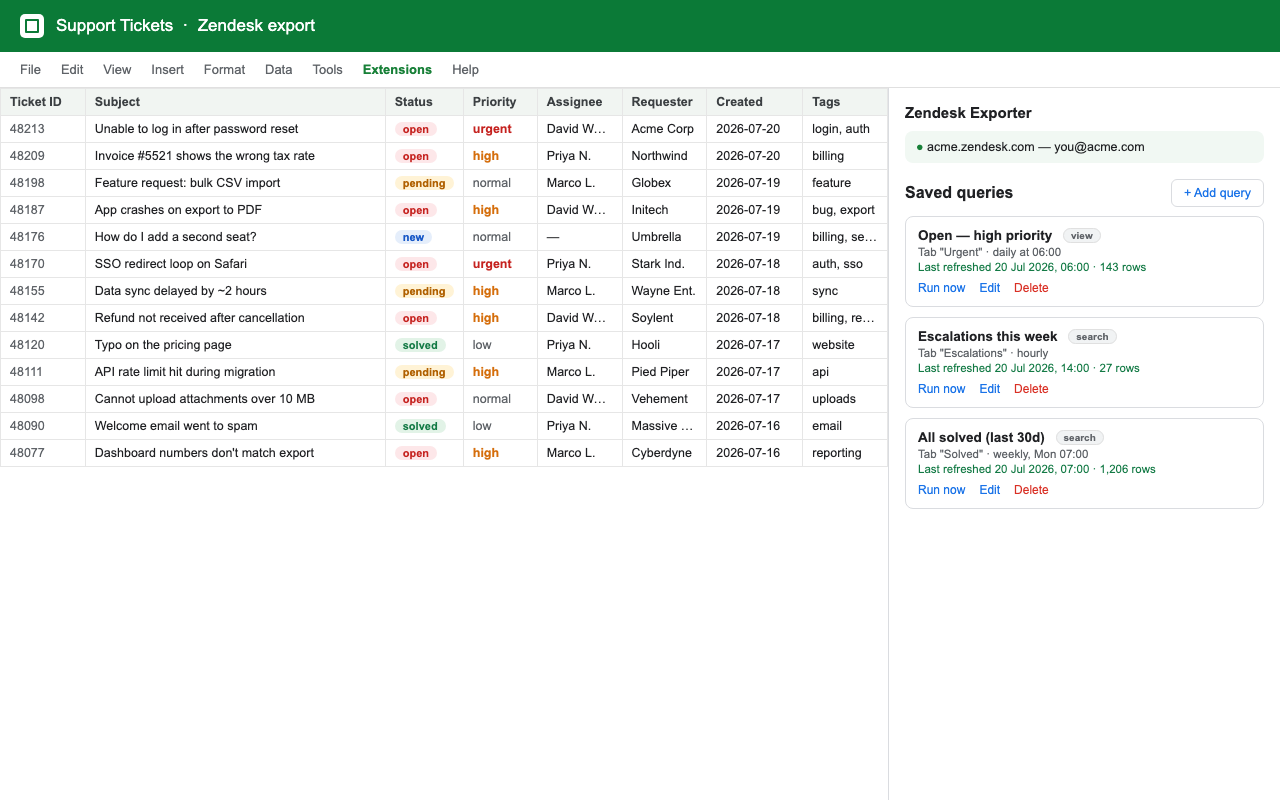
The add-on lives entirely in the Extensions menu inside Google Sheets — there is no separate website or app to sign in to.
Keep a weekly or daily ticket report in Sheets for support volume, backlog, status, priority, assignee, and custom-field analysis.
Export the ticket fields your team uses for quality checks, service-level reporting, and stakeholder dashboards.
Use Zendesk search syntax when a view is not enough, then keep that query as a reusable scheduled report.
Work in Google Sheets instead of downloading, cleaning, and re-uploading a CSV every time a report is due.
Yes. Pro supports hourly, daily, and weekly refreshes for saved views and searches.
Yes. Select the standard and custom ticket fields that belong in each report.
No. The export runs between your Zendesk account and the Google Sheet where you use the add-on. Credentials are stored in your Google account's add-on storage.
Polar (our checkout and billing provider) emails you an order confirmation with a link to your account portal. Sign in there with a one-time code sent to your email — no password or separate signup — then copy your license key and paste it into the sidebar's license field.
You'll get your license key by email after checkout — sign in to your account portal to copy it.
Zendesk has no native scheduled export. The API/Apps Script route to build one, and the add-on shortcut.
Why plain search stops at 1,000 results, and how the search export endpoint gets past it.
Which of Zendesk's four reporting tools fits an operational queue, an ad hoc question, or a dashboard.
Scheduled Asana project and portfolio exports to Google Sheets, on any Asana plan.
Scheduled JQL and saved-filter imports from Jira into Google Sheets.