QB

QuickBooks Bulk Importer

QuickBooks Bulk Importer is a Google Sheets™ add-on that validates every row against your QuickBooks company's live chart of accounts, terms, and customers, then bulk-pushes the clean rows into QuickBooks Online — no more CSV imports that fail on the first bad row.

Live

Install from Google Workspace Marketplace

What is QuickBooks Bulk Importer?

QuickBooks Bulk Importer is a Google Sheets™ add-on published by Cody Labs. It connects to your QuickBooks Online company through QuickBooks' official OAuth flow, generates a template sheet with dropdowns pulled from your real account codes, terms, and contacts, and validates every row — accounts, terms, dates, amounts, and contact matches — before anything is written. Clean rows are then created or updated in QuickBooks in bulk, with SyncToken concurrency safety to prevent silent overwrites if a record changed in QuickBooks since your last sync. Your data flows directly from your spreadsheet to your QuickBooks company: we operate no servers and never receive your financial data. See the privacy policy for full details.

What it does

Invoices, bills & customers

Sales invoices, bills, and customers — multi-line documents built from consecutive rows.

Validation before the books

Every row is checked against your live chart of accounts, terms, and customers. Errors show up as cell notes, not surprises in QuickBooks.

Live dropdowns from your org

The template's account, term, and customer dropdowns are pulled straight from your QuickBooks company.

SyncToken-safe upserts

Staleness blocks updates if a record changed since last sync, asking you to refresh instead of silently overwriting.

How it works

Four steps, all inside the sheet you are already working in. Nothing is written to QuickBooks until you have seen the validation result.

  1. Connect your QuickBooks company

    Open the sidebar from Extensions › QuickBooks Bulk Importer and click Connect to QuickBooks. You sign in through QuickBooks' own OAuth screen — the add-on never sees your password. The sidebar then shows which company you are connected to, so you always know where rows are going.

  2. Generate a template from your live data

    Pick invoices, bills, or customers and click 1 · Create template tab. The add-on reads your company's real chart of accounts, payment terms, customers, and products, and builds a sheet whose dropdowns contain exactly those values — so a typo that QuickBooks would reject can't be entered in the first place.

  3. Fill in your rows and validate them

    Paste or type your data, then click 2 · Validate rows. Every row is checked against the live company: unknown accounts, bad dates, unmatched customers, and stale records are all flagged in the sheet before anything is written. Clean rows are marked OK; problem rows get an explanation in the row itself.
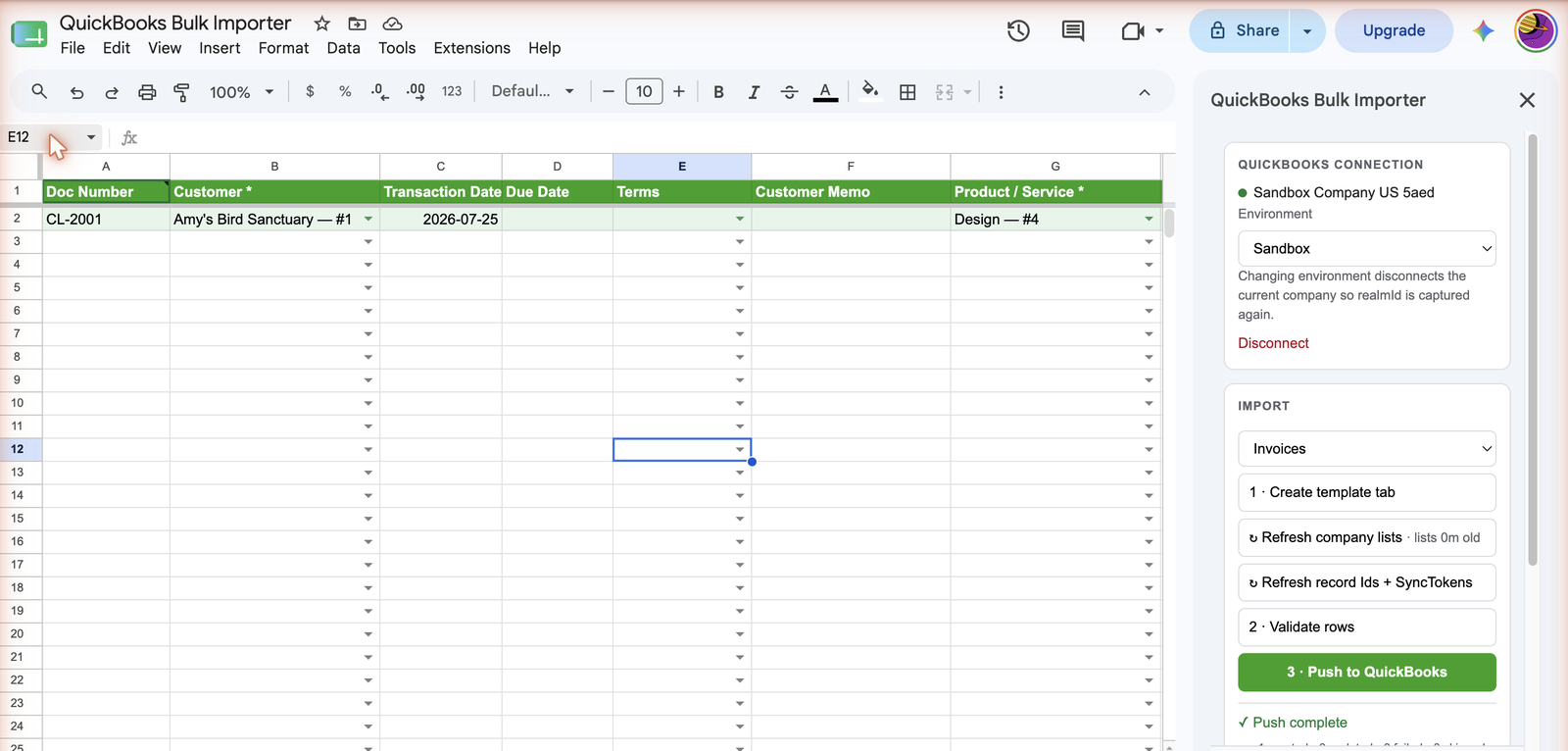
    The QuickBooks Bulk Importer sidebar connected to a QuickBooks company, next to a generated invoice template with dropdowns for customer and product.
    The sidebar shows the connected company and the three-step import panel; the template's dropdowns come from that company.
  4. Push, and get an audit trail back

    Click 3 · Push to QuickBooks. Clean rows are created or updated in bulk, and the results are written straight back into the sheet: the QuickBooks record Id, its SyncToken, a created/updated result, and a direct link to the record. An append-only Activity Log tab records every run, so you can show exactly what was posted and when.
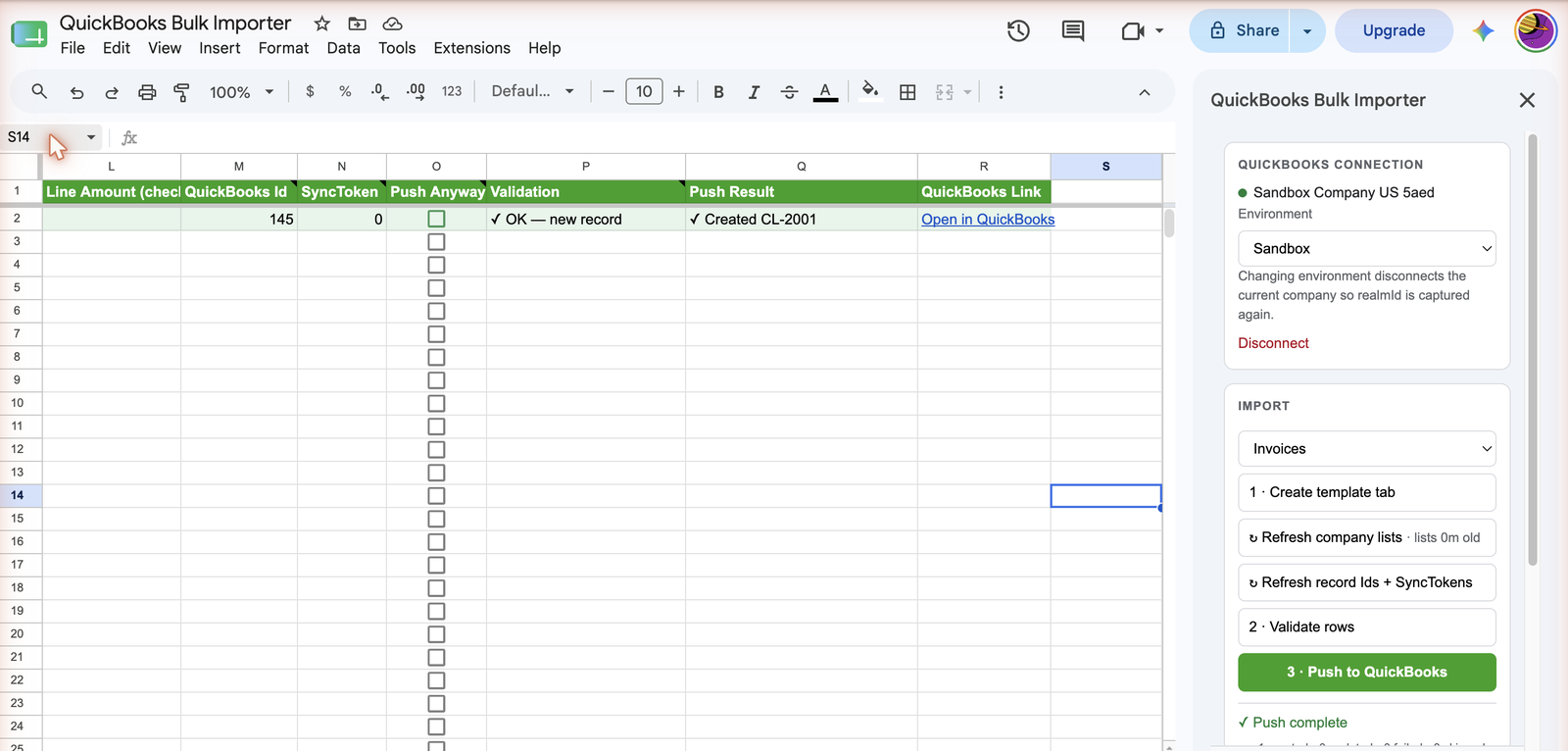
    After a push, the sheet shows the QuickBooks record Id, SyncToken, validation result, push result, and a link to open the record in QuickBooks.
    Every pushed row comes back with its QuickBooks Id, SyncToken, result, and a link to the record.

What you need before you start

  • A QuickBooks Online company, and an account with permission to create invoices, bills, or customers in it.
  • A Google account, and edit access to the spreadsheet you want to import from.
  • Nothing else — there is no server to set up, no API key to paste, and no data leaves your sheet and your QuickBooks company.

Pricing

Free
$0
  • 20 pushed rows per month
  • Full validation, always
  • Invoices, bills & customers
Pro
US$20/mo
  • Unlimited pushed rows
  • US$200/yr option
  • Flat price per company
Get Pro — US$20/mo

You'll get your license key by email after checkout — sign in to your account portal to copy it.

Frequently asked questions

Can I import invoices into QuickBooks from Google Sheets?

Yes. The add-on supports invoices, bills, and customers, with generated templates and row-by-row validation before anything is pushed.

Will it overwrite records changed in QuickBooks since my last sync?

No. SyncToken staleness blocks the update and asks you to refresh — ensuring you never silently overwrite recent changes.

Is this an official QuickBooks product?

No. It is an independent add-on published by Cody Labs. QuickBooks is a trademark of Intuit, Inc.

Related products

Bulk Importer for Xero

The same validate-before-you-push workflow for Xero invoices, bills, and contacts.

Free invoice CSV preflight checker

Catch missing columns, ambiguous dates, invalid amounts, duplicate numbers, and spreadsheet formula risks in your browser before importing.