BX

Bulk Importer for Xero

Xero can't import invoices from Excel, and its CSV import fails on the first bad row. This Google Sheets™ add-on validates every row against your org's live chart of accounts and tax rates first, then bulk-pushes the clean ones into Xero.

Live

Install from Google Workspace Marketplace

What is Bulk Importer for Xero?

Bulk Importer for Xero is a Google Sheets™ add-on published by Cody Labs. It connects to your Xero organisation through Xero's official OAuth flow, generates a template sheet with dropdowns pulled from your real account codes, tax rates, and contacts, and validates every row — accounts, tax treatment, dates, amounts, and contact matches — before anything is written. Clean rows are then created or updated in Xero in bulk. Your data flows directly from your spreadsheet to your Xero organisation: we operate no servers and never receive your financial data. See the privacy policy for full details.

What it does

Invoices, bills & contacts

Sales invoices (ACCREC), bills (ACCPAY), and contacts — multi-line documents built from consecutive rows.

Validation before the books

Every row is checked against your live chart of accounts, tax rates, currencies, and contacts. Errors show up as cell notes, not surprises in Xero.

Live dropdowns from your org

The template's account, tax-rate, currency, and contact dropdowns are pulled straight from your Xero organisation.

Safe upserts

Matches by invoice number and updates only DRAFT or SUBMITTED documents — approved and paid records are never touched.

How it works

Four steps, all inside your spreadsheet. Nothing reaches Xero until the rows have been checked against your live organisation.

  1. Connect your Xero organisation

    Open the sidebar and click Connect to Xero, then Use this organisation. Authorisation runs through Xero's own OAuth screen. If you work across several entities, Switch organisation moves between them.

  2. Generate a template for the record type

    Choose invoices, bills, or contacts. The template is built from your organisation's real chart of accounts, tax rates, currencies, and contacts, so the dropdowns only ever offer values Xero will accept.
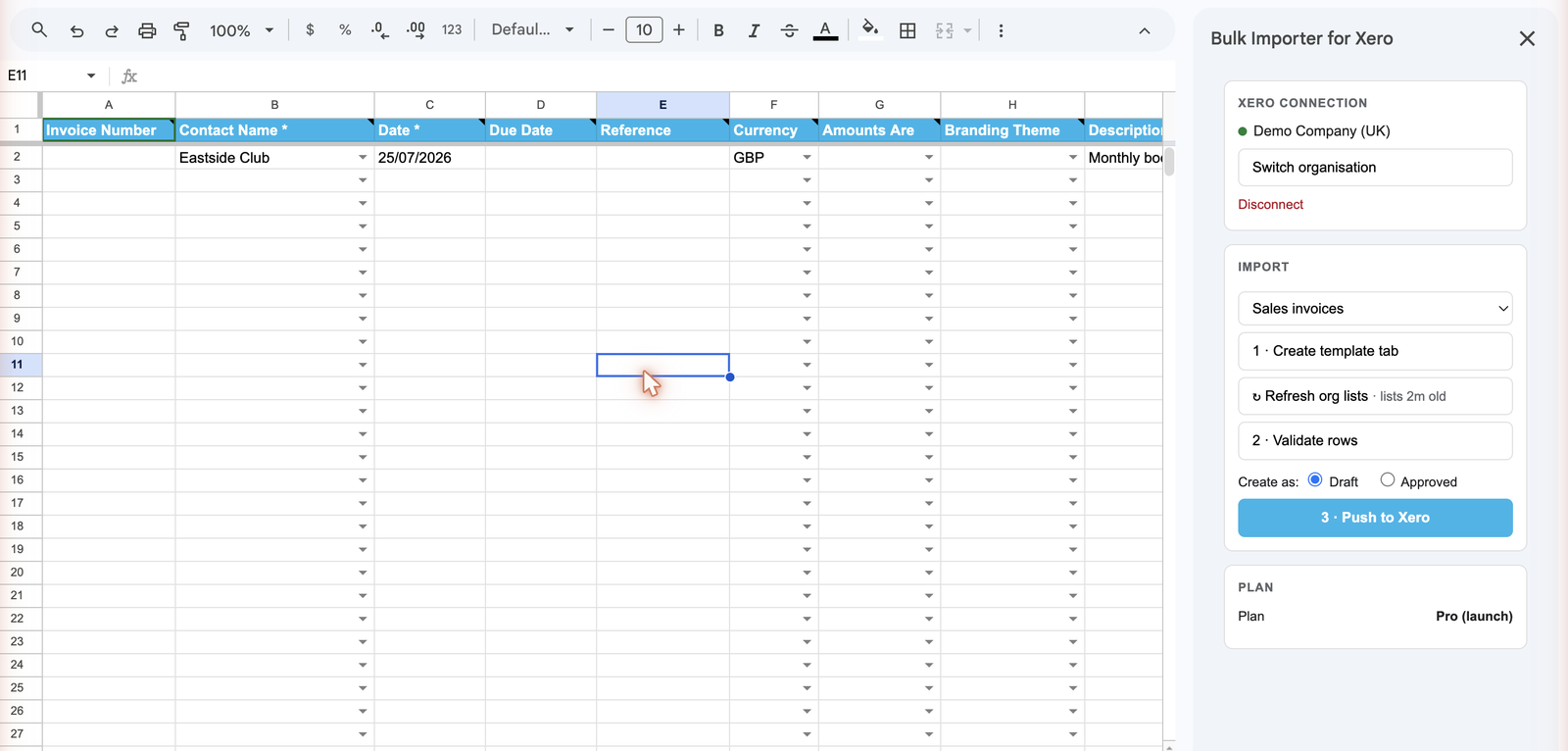
    The Bulk Importer for Xero sidebar connected to Demo Company (UK), next to a template row filled in with contact, date, currency, and description ready to validate, with the Push to Xero button in the sidebar.
    The template's dropdowns are pulled from your live Xero organisation, so a row can only be filled with values Xero will accept.
  3. Validate every row first

    Rows are checked against those live lists plus document status — accounts, tax rates, currencies, contacts, and whether a record is still editable. Problems are reported per row, in the sheet, before anything is written.

  4. Push, and keep the audit trail

    Clean rows are created or updated in bulk. Only draft and submitted records are ever updated — authorised records are left untouched. Results, assigned document numbers, deep links, and an append-only activity history are written back to the workbook.
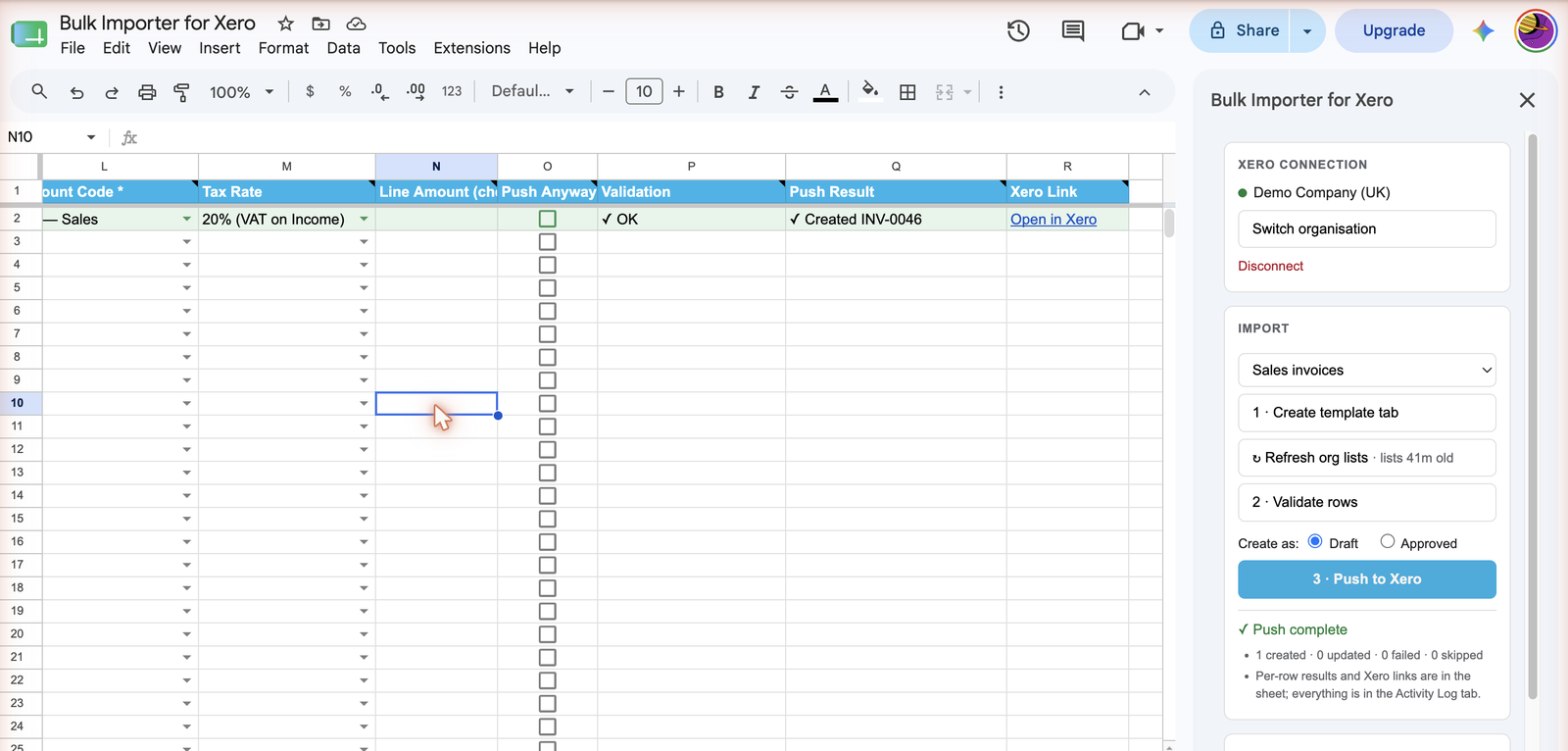
    The Invoices sheet after a successful push, showing Validation OK, a Push Result of "Created INV-0046", and an Open in Xero link, alongside the sidebar's Push complete summary of 1 created, 0 updated, 0 failed, 0 skipped.
    Every pushed row gets its Xero result, assigned document number, and a deep link back into Xero, written directly into the sheet.

What you need before you start

  • A Xero organisation, and a user account with permission to create invoices, bills, or contacts in it.
  • A Google account with edit access to the spreadsheet.
  • Nothing else — no server to run and no API key to paste.

Pricing

Free
$0
  • 20 pushed rows per month
  • Full validation, always
  • Invoices, bills & contacts
Pro
US$20/mo
  • Unlimited pushed rows
  • US$200/yr option
  • Flat price per organisation
Get Pro — US$20/mo

Polar emails your license key after checkout. Paste it into Activate Pro in the add-on sidebar.

Frequently asked questions

Can I import invoices into Xero from Google Sheets?

Yes. The add-on supports sales invoices, bills, and contacts, with generated templates and row-by-row validation before anything is pushed.

Will it overwrite approved Xero documents?

No. Updates match by document number and only ever touch DRAFT or SUBMITTED documents — authorised and paid records are never modified.

Is this an official Xero product?

No. It is an independent add-on published by Cody Labs. Xero is a trademark of Xero Limited.

Related products

QuickBooks Bulk Importer

The same validate-before-you-push workflow for QuickBooks invoices, bills, and customers.

Free invoice CSV preflight checker

Catch missing columns, ambiguous dates, invalid amounts, duplicate numbers, and spreadsheet formula risks in your browser before importing.